Building management, crystal clear.
Dues, collections, bank transactions, requests and announcements. One app for managers, management companies and residents.
Free for 30 days. No card required.
- Commission on dues payments
- 0%
- Free trial, no card required
- 30 days
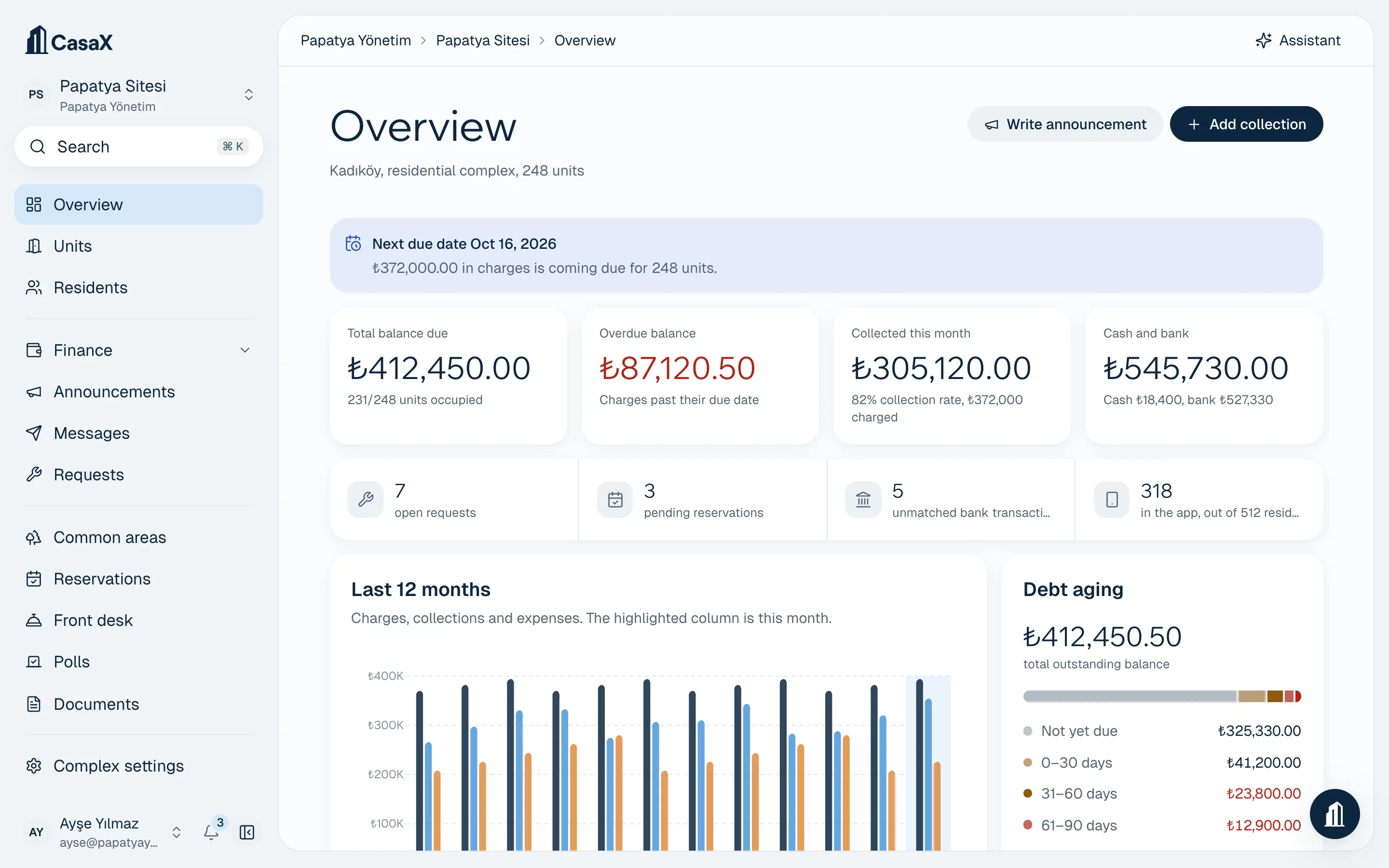
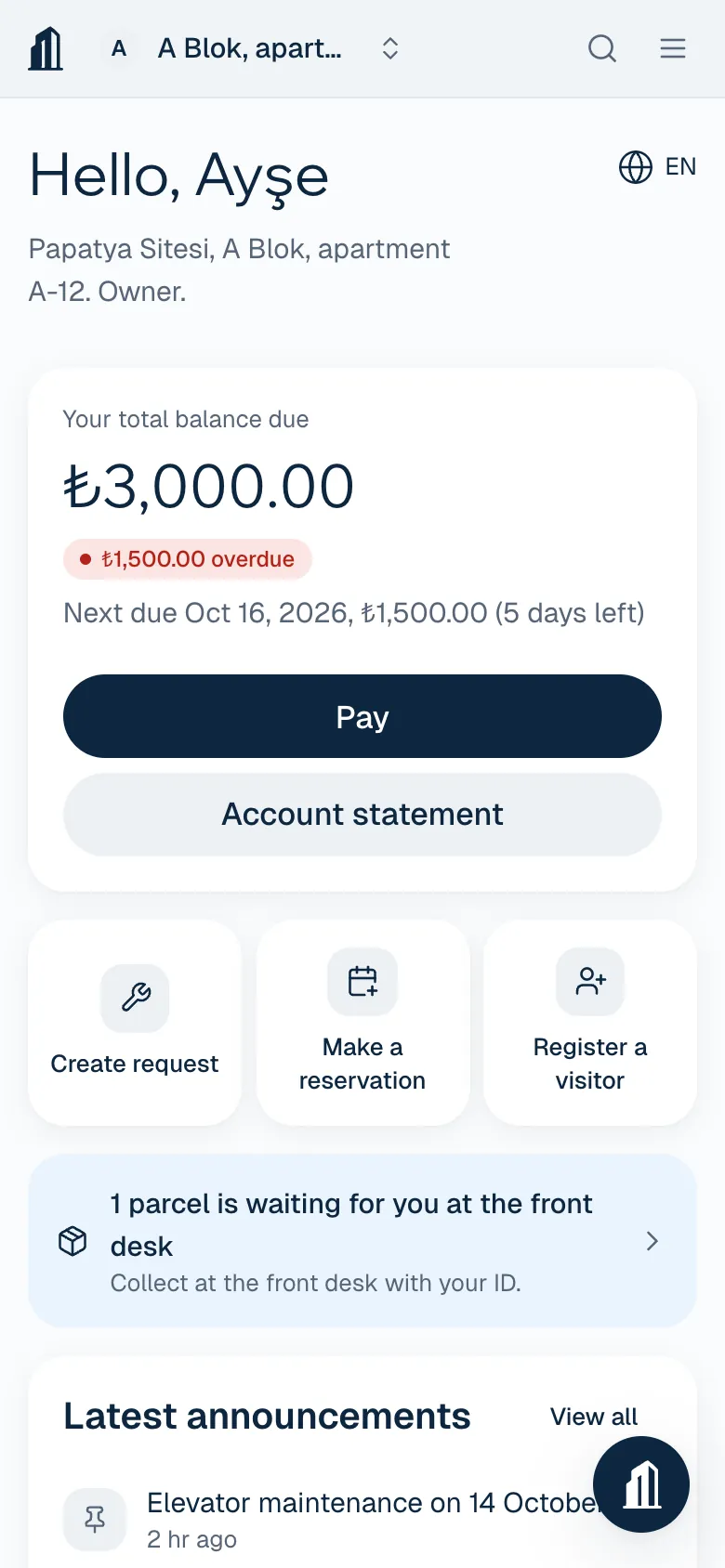
Sample data from a fictional complex.
Everything a complex runs on, in one app
Money, communication and daily operations share the same records. Every module, including reservations, visitors and parcels, comes with every paid plan. No add-ons.
Set up dues once and they publish themselves every month.
Split charges as a fixed amount, equally, by land share, by m², by coefficient or by headcount, and see each apartment's share before you publish. Collections clear the oldest balance first, and receipts are created automatically.
- Dues, heating, fixtures, water and special budgets as separate items
- Late fees under Condominium Law art. 20: 5% a month, prorated daily
- Cash, transfer, POS, check and offset in one ledger
- Residents with no balance download their own no-debt certificate
Residents pay by card, and the money lands in the complex's account.
Your complex connects its own iyzico or PayTR account. Payments go straight there, and CasaX takes no commission on them. The complex can cover the provider's fee or show it to the resident as a separate line at checkout.
- Collections and receipts are recorded as soon as payment arrives
- Installment options set per complex
- Turn it on or off separately for web, iOS and Android

Transfers match themselves to apartments.
With BankSocket, your bank account's transactions come in at regular intervals. When the unit code in the description, the sender IBAN and the amount line up, the collection is recorded automatically. Anything uncertain comes to you for approval, with the reason.
- Learns IBAN rules from the matches you approve
- Outgoing payments are listed as expense candidates
- Residents see their balance clear after a transfer
Every fault report and announcement is logged, read and answered.
Residents open requests with photos, your team assigns and closes them with comments, and shared faults are visible to everyone. Announcements go out by push notification, SMS and email, and you can see who read them.
- Target announcements to a block, to owners or to tenants
- Poll votes per unit or weighted by land share
- SMS sent from your own Netgsm account

The pool calendar, the guest at the gate, the parcel at the booth.
Set opening hours, capacity and weekly limits for common areas, and double bookings can't happen. Residents register guests in advance, staff check them in with a code, and incoming parcels are logged with a notification to the owner.
- Paid reservations are posted to the ledger as charges
- QR or 6-digit code for visitors
- A simple phone screen for on-site staff

A dashboard for everyone
Managers, management companies and residents work from the same records, and everyone sees only what they're allowed to. Residents don't have to use the app.

Daily work runs itself.
Payments, reports, faults and parcels at the gate share one ledger. Your team works from records instead of phone calls, and residents see what's happening in their notifications.
Residents pay by card
Payments go to the complex's iyzico or PayTR account, and the collection and receipt are recorded automatically.

Month-end books, ready
Income and expense statement, debtor list and apartment statements in Excel or PDF, in one click.
Fault reports and follow-up
Residents open requests with photos, your team assigns and closes them with comments. Shared faults are visible to everyone.
Parcels and guests
Incoming parcels are logged and the owner is notified. Guests are registered in advance and staff check them in with a code.
Meet CasaX Assistant.
Ask your complex's books a question in plain language. The Assistant only sees what your permissions allow, and asks before it sends or saves anything.
Start for free- What's our collection rate this month?
- Apartments with balances over 3 months old
- Show the statement for A-12
- List unmatched transfers
- Post an announcement about elevator maintenance
Your plan includes a monthly message allowance. No credits to count.
Built on secure foundations
Dues money, resident details and bank transactions live in one place, so permissions, logging and encryption come first.
Owner, admin, complex manager, accountant, staff and auditor. Each team member sees only the complexes and actions they're allowed to, and auditors get read-only access to financial records.
Financial records are never deleted: a wrong entry is voided and a reversal is created. The activity log shows who changed what, and when.
Card payments happen on iyzico's or PayTR's secure payment page. CasaX never sees or stores card details.
Keys for payment provider and bank connections are stored encrypted, and only the organization's owner and admins can change a connection.
Resident data is processed as described in the KVKK privacy notice. Residents can see their own records and delete their account from the app.
How many units do you manage?
The total number of units across all your complexes. Prices exclude VAT; pay yearly and get 12 months for the price of 10.
Everything in your pocket, wherever you are.
In the iOS and Android app, managers check reports, record collections and approve bank matches. In the same app, residents pay their balance, open requests and book common areas.
Move to CasaX in six steps.
The setup wizard saves every step, so you can take a break and pick up where you left off. Blocks, floors and apartments are created from a few numbers.
Step 1: Create your account
Name, email and phone. Tell us whether you manage your own complex or run a management company.
Step 2: Set up your complex
Name, type and address. Management companies add more complexes from the same account later.
Step 3: Create blocks and apartments
Enter blocks, floors and apartments per floor, then preview the grid. Add shops and parking spaces, or upload the list from Excel.
Step 4: Set up dues
Monthly amount or total budget and allocation method, due date, late fee, cash and bank accounts. Your first charge draft is ready to review.
Step 5: Connect payments and your bank
Add the complex's iyzico or PayTR account and the BankSocket connection. Card payments and transfers turn into collections on their own.
Step 6: Invite residents
Upload them from Excel, send invites by SMS or email, or share the complex's invite code.
Frequently asked questions
If you can't find your answer here, write to us.
What's included in the trial?
For 30 days, every feature of the Site 600 plan is open: 600 units, 5 complexes, online dues payments and bank matching. We don't ask for a card.
What happens to our data when the trial ends?
Nothing is deleted. Until you choose a plan, the management dashboard is read-only; the resident app and online payments keep working.
Do you take a commission on dues payments?
No. Your complex connects its own iyzico or PayTR account and the money goes straight there. The complex either covers the payment provider's fee or shows it to the resident as a separate line at checkout. It's your call.
Do residents have to download the app?
No. Residents who don't use the app get announcements and payment reminders by SMS or email, and can sign in on the web if they like. Apartment and balance records don't depend on residents using the app.
Can we switch from another program or Excel?
Yes. Import apartments and residents from Excel: download the template and fill it in, or map the columns of your own file and preview before importing.
Do we pay for SMS?
SMS messages go out through your organization's own Netgsm or Twilio account, and you pay your provider directly. CasaX doesn't sell SMS bundles.
How is our data protected?
Keys for payment and bank connections are stored encrypted, and card details never reach CasaX. Team members work with permissions limited by their role, and every change to financial and resident records is written to the activity log.
Publish your first dues today.
Every module is open for 30 days, no card required. If you get stuck during setup, write to us.